
How to Sell on eBay

Selling on eBay provides a unique opportunity to reach a vast audience, offering tools to not only sell directly but also promote your listings to attract more potential buyers. Leveraging eBay’s marketplace can complement your existing online store, allowing you to connect with a broader customer base, boost sales, and accelerate your business growth. Building a global reach for your business is a significant milestone, and while platforms like Shopify allow you to connect with a wide audience, adopting an omnichannel approach—integrating additional channels like eBay—can help you fully capitalize on new growth opportunities.
To get started with eBay, you’ll need to create an account, set up and optimize your listings, and establish shipping methods. Additionally, there’s an option to connect eBay to your Shopify store for streamlined management.
This eBay selling guide provides a step-by-step overview of how to succeed on this platform, outlining what it has to offer to online business owners.
How to sell on eBay in 6 steps
- Sign Up for an eBay Account
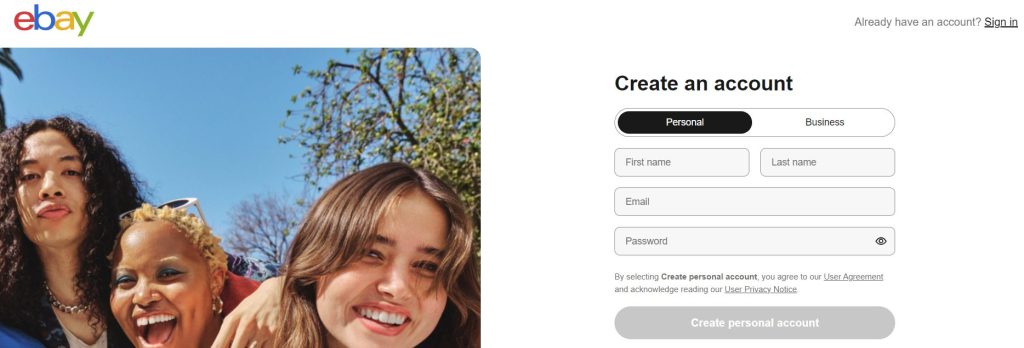
If you’re a registered business—whether a sole proprietorship, LLC, or other—head to eBay’s registration page to create a seller account. You’ll need to provide essential business information, such as your company name, type, and location. Follow these steps:
- Go to the registration page.
- Enter your business name and email address.
- Create a password.
- Provide your business location.
- Click “Create account.”
You’ll also have the option to select a username, which can be changed later.
- Set Up Your Seller Account
After registering, eBay will send a verification email. Once verified, you’ll be asked to answer questions about your business, including details such as whether you’re a sole proprietor, registered business, or nonprofit, as well as contact and bank information. Take a moment to review and confirm your information before proceeding to eBay’s homepage.
To get started with eBay, you’ll need to create an account, set up and optimize your listings, and establish shipping methods. Additionally, there’s an option to connect eBay to your Shopify store for streamlined management.
This eBay selling guide provides a step-by-step overview of how to succeed on this platform, outlining what it has to offer to online business owners.
- Create a Listing
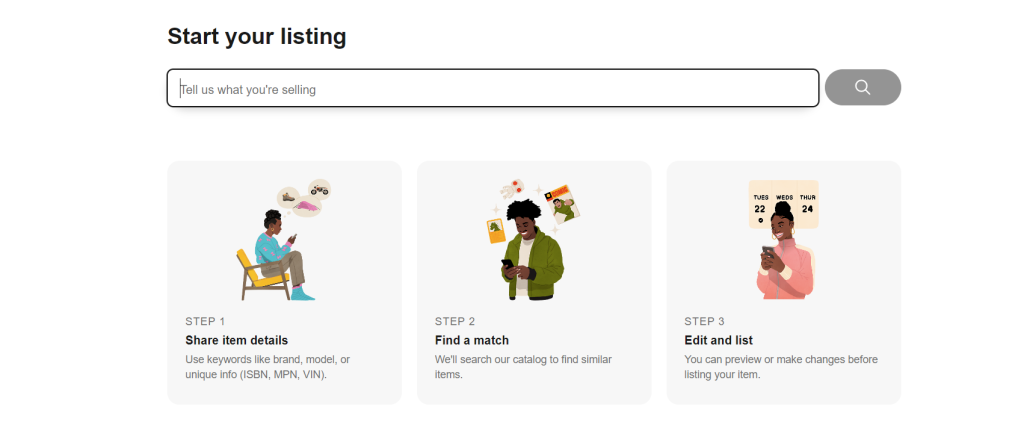
To start listing products, make sure you have inventory ready. If you’re an established seller, you may already have stock; if not, you’ll need to add products to your store. Once you’re set, go to the Seller Hub and select “Create listing” from the Listings dropdown.
For each listing, you’ll configure the following:
- Product Title and Identifier: Use clear, descriptive names that incorporate relevant keywords.
- Product Description: Detail what the product does, focusing on benefits and key features.
- Category and Details: Choose the most appropriate category for easy discoverability.
- Quantity, Price, Weight, and Shipping Options: These factors help buyers understand total costs.
- Item Specs and Variations: Specify any options such as size, color, or style.
- Condition of the Product: Clearly state if the item is new or used.
You’ll also have the opportunity to upload photos and videos. Once all details are finalized, click “Save” and make your listing live.
- Optimize Your Listing
Using keywords strategically in your product titles and descriptions is essential for appearing in eBay searches. Buyers often search with specific phrases, so ensure your listing includes keywords that match potential search terms, like “men’s Nike Air Yeezy,” “32GB iPhone 7S unlocked,” or “large macrame flower pot hangers.”
For effective product descriptions, emphasize benefits rather than technical details. For instance, mention that a water bottle “keeps beverages cold for hours,” instead of only specifying the material. Use bullet points for easy readability, and incorporate relevant keywords. Proper capitalization and punctuation help create a polished appearance, making the content easy for buyers to scan and understand.
Key elements to include in listing titles and descriptions:
- Brand (e.g., “Nike,” “Apple”)
- Model (e.g., “Air Yeezy,” “iPhone 7S”)
- Product Description (e.g., “shoes,” “laptop”)
- Color and Size (e.g., “red,” “women’s size 10”)
Consider answering common questions upfront in the product description, such as:
- Dimensions or measurements
- Recommended size options
- Included accessories
- Unique features
This additional information can reassure buyers and reduce time spent answering inquiries.
- Select Shipping Options
Modern shoppers often expect free shipping, so consider building this into your pricing strategy. Offering options like expedited shipping can make your listings more attractive.
eBay’s Guaranteed Delivery (EGD) program provides shoppers with guaranteed delivery dates without impacting the seller’s metrics. To qualify for EGD, sellers must offer same-day or one-day handling times, maintain an on-time shipment rate, and fulfill at least 100 transactions annually. EGD enhances visibility and sales while assuring buyers of quick delivery.
For global reach, eBay’s Global Shipping Program (GSP) enables international shipping without added complexity. Sellers ship items to eBay’s global center in Kentucky, where the platform handles international logistics and paperwork, ensuring customers have a seamless shopping experience.
6. Promote Your Listings (Optional)
To give your listings extra visibility, consider using eBay’s Promoted Listings feature, which boosts search placement and can increase clicks and conversions. Many sellers report up to a 36% improvement in listing visibility. With Promoted Listings, you pay only when an item sells. Additional tools, such as Seller Hub Promotions, allow you to create special offers, discounts, and even codeless coupons to attract more buyers.
What to Sell on eBay: Product Research with eMerchantClub’s Wholesale Lines
eBay offers a thriving marketplace for a variety of popular product categories, perfectly suited for eMerchantClub’s six wholesale lines. By leveraging eBay, eMerchantClub members can reach a larger audience with products such as:
- Electronics and Accessories: From tech gadgets to essential accessories, these items cater to eBay’s large base of tech-savvy shoppers.
- Medical Supplies: High-demand healthcare items and medical supplies can attract buyers looking for trusted products for their personal or professional needs.
- Home Décor: Unique and stylish décor items are perfect for buyers looking to enhance their living spaces with distinctive touches.
- Home Goods: Practical and decorative household items that appeal to everyday needs, from kitchen essentials to organizational products.
- Adult Products: Discreet and in-demand items that cater to a niche yet expansive market within eBay’s platform.
- Jewelry: Fashion-forward jewelry pieces that meet the needs of eBay’s style-conscious shoppers, offering variety and elegance.
For eMerchantClub members, selling on eBay provides an incredible opportunity to reach a vast, diverse audience looking for quality products. eBay’s expansive marketplace connects sellers with millions of potential buyers worldwide, making it an ideal platform to showcase a wide range of products. By listing eMerchantClub’s wholesale items—whether electronics, medical supplies, home décor, home goods, adult products, or jewelry—members can tap into eBay’s powerful customer reach, gaining visibility and driving sales beyond traditional sales channels.
With eBay’s tools for listing optimization, promotional options, and customer engagement, eMerchantClub members can effectively present their products to an engaged audience. This access to eBay’s marketplace can accelerate growth, expand brand awareness, and provide new sales opportunities—all by meeting customers where they already shop.
We Can Help You Build Your eBay Store!
Ready to take the next step? Call us now to get started!