
How to create Facebook Business page

Facebook remains the world’s largest social network, with a huge user base. The latest statistics reveal that the platform has 2.89 billion monthly active users. That’s a massive audience that businesses could miss out on if they don’t maintain an effective Facebook Business Page.
A Facebook Business Page is essential for any Facebook marketing strategy. It’s where businesses can share information, showcase new products, and interact with customers. This guide will walk you through the steps to create a Facebook Business Page that resonates with your audience.
Table of Contents:
- What is a Facebook Business Page?
- Steps to create an effective Facebook Business Page
- Tips for maintaining an engaging Facebook Business Page
What is a Facebook Business Page?
A Facebook Business Page is a public account designed to represent a commercial organization. It allows you to share essential business information such as your address, contact details, and operating hours. This page also serves as a platform to promote products, services, events, and business updates.
A well-maintained Business Page helps you connect with your audience by providing a dedicated space for communication and promotion. Through a Facebook Business Page, you can access features like Facebook Shops and advertising tools, enabling you to list products directly on Facebook and run ads to expand your reach.
If you already have a Facebook Business Page but want to take it further, consider using our Facebook marketing template. This resource offers step-by-step guidance on maximizing Facebook’s tools to improve your strategy.
Need a Facebook Business Page?
eMerchantClub offers full Facebook Business Page build and management services to help you connect with more customers. Let us handle the setup and growth of your page so you can focus on your business.
Steps to Create an Effective Facebook Business Page
Ready to set up your own Facebook Business Page? Follow these steps to get started.
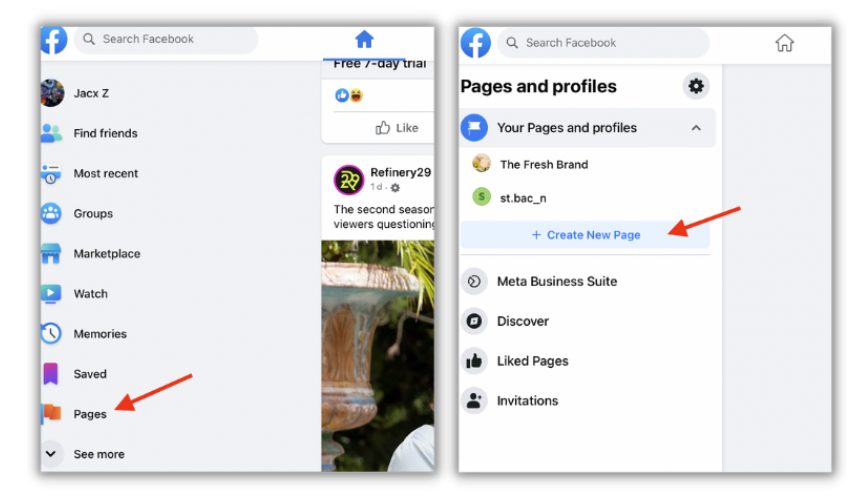
Step 1: Start by Creating a New Page in the “Pages” Section
On your Facebook homepage, find the “Pages” option on the left sidebar. This will take you to a dashboard where you can manage all your existing Pages and profiles. Select “Create New Page” under “Your Pages and Profiles” to begin.
Step 2: Enter Your Page Name and Category
Next, choose a name for your Page. This should match your official business or brand name so that your audience can easily recognize it. It’s important to select a name that aligns with what customers would type when searching for your brand.
After naming your Page, add a category. Type a relevant keyword, and Facebook will provide category suggestions. You can select up to three categories, which help communicate your business type to visitors.

Step 3: Add a Brief Bio
Although the bio section is optional, a short description about your business can be very helpful. In about 100 characters, summarize what your brand does and what it represents. Since this appears prominently under your Page name, keep it catchy and on-brand. Using your company slogan here can be a good choice. Once finished, click “Create Page.”
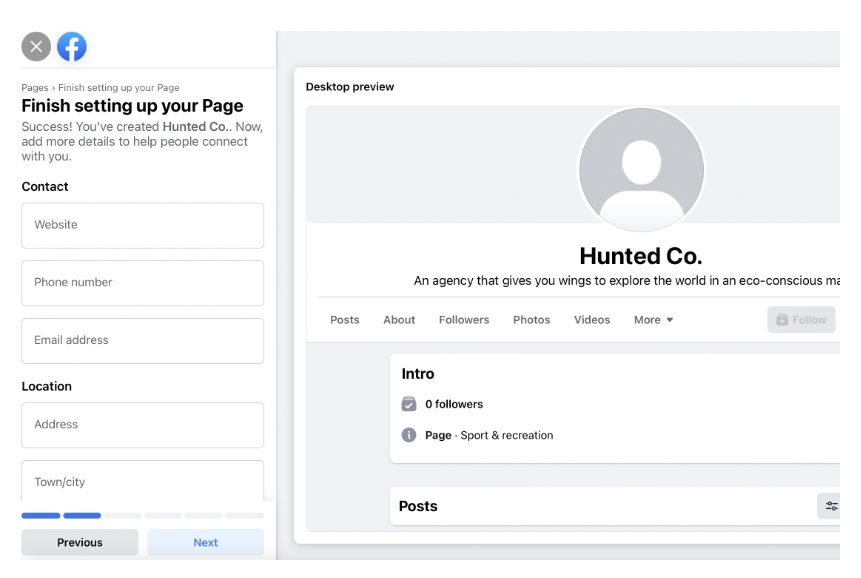
Step 4: Provide Additional Business Details
Now that your Page is created, it’s time to make it more complete by adding further details. This includes your:
- Website
- Phone number
- Email address
- Physical location
- Operating hours
After entering this information, click “Next” to proceed. You can skip this for now, but completing these fields improves your Page’s professionalism and usefulness.
Step 5: Set Up Profile and Cover Photos
The visual elements of your Page are key to making a strong first impression. Use high-quality imagery that reflects your brand and resonates with your audience.
Start with a profile picture, ideally your brand logo, to reinforce brand recognition. According to Facebook’s guidelines, this image should be at least 180 x 180 pixels, and remember it will display as a circle, so avoid placing important details in the corners. Local businesses might also consider using a photo of their storefront or a signature product.
For the cover photo, use an image that’s 820 x 312 pixels to avoid stretching or distortion. Tools like Canva provide templates that can help you create a perfectly sized cover photo.
You can also add an action button to your Page. This button directs visitors toward actions like booking an appointment, viewing your store, calling, messaging, or purchasing tickets. Choose the action that best suits your goals, click “Next,” and hit “Save.”


Step 6: Additional Options and Finalizing Setup
Facebook offers extra options to enhance your Page. You can link WhatsApp for messaging and invite friends to follow your Page. While these steps are optional, they’re valuable for strengthening your Page’s reach and engagement. Completing these actions also improves your Page’s “health,” which Facebook tracks as a measure of how complete and engaging your Page is.
With your Page set up, you’re ready to start posting updates and running ads to reach more people.
Tips for Maintaining an Engaging Facebook Business Page
Creating a Facebook Business Page is just the beginning; maintaining it takes consistent effort. Here are some social media management tips to help you engage your audience.
- Keep Business Information Updated
Your Facebook Page serves as a resource for people looking to learn more about your business. Make sure your address, contact details, and hours of operation are accurate. If you have special hours for holidays or events, update them to avoid confusion.
- Set Clear Goals
Setting goals provides direction for your Facebook strategy. Consider the primary purpose of your Page and your target audience. Are you building a community of loyal customers? Or are you trying to attract new ones? Define specific, achievable goals that support your Page’s growth and inform your content and engagement strategies.
- Develop a Facebook Content Strategy
Consistency is key when posting on Facebook. Research shows that most brands post several times a week. Think about what your audience wants to see—whether it’s product information, behind-the-scenes content, or exclusive promotions. Tailor your content strategy to meet their interests while promoting your brand.
According to recent studies, 68% of U.S. consumers follow brands on social media to learn about products and services, while 46% do so for exclusive deals. Treat your Page like a storefront and don’t shy away from promoting your offerings.
- Engage with Your Customers
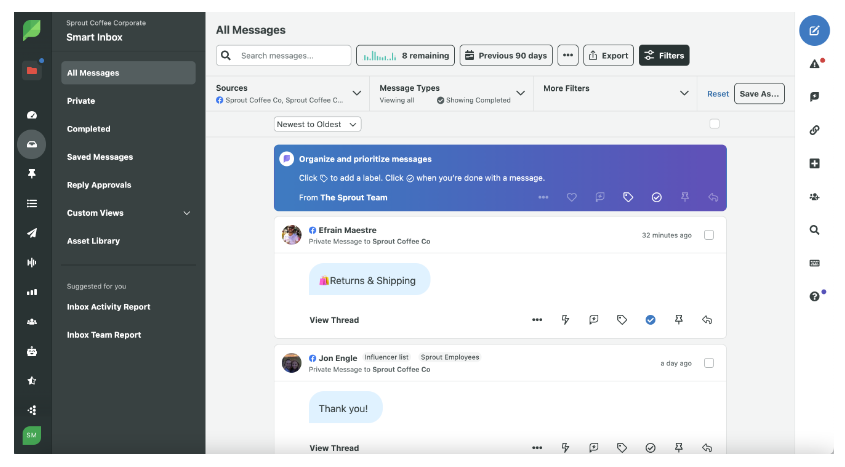
Your Facebook Page isn’t a “set it and forget it” tool. Customers may comment on posts or message you with questions, and failing to respond can lead to lost sales or disengaged followers. Be active on social media, responding promptly to queries. Using a social media management tool, such as Sprout Social’s Smart Inbox, can help streamline notifications and keep track of conversations.
- Use Analytics to Guide Your Strategy
Facebook Page Analytics provides insights into how your audience interacts with your posts and overall Page. This data can inform decisions, allowing you to adjust your strategy. For example, if video posts have higher engagement, consider sharing more video content.
Once you start running ads, you’ll have access to performance metrics. Experiment with ad copy, placements, and visuals to determine what resonates most with your audience, building an evolving advertising strategy based on real data.
Start Building Your Facebook Page
With these steps and tips, you’re well-equipped to create and grow an engaging Facebook Business Page. Use this guide alongside a comprehensive marketing strategy to expand your reach. For more insights, check out our guide on using Facebook Business Manager for tips on managing and optimizing your Page.